
Get Support
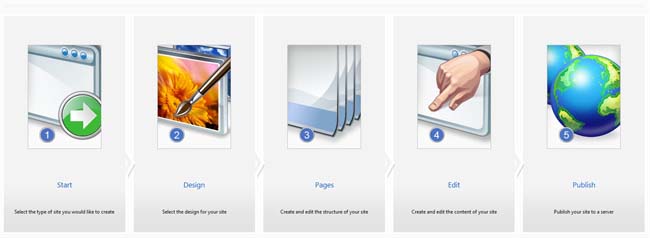
5 easy Steps!

Choose your web site name
Give your project a name and specify the pages you need for your website.

Select a template
Choose from a huge range of professionally designed personal and business website templates.

Select or upload your Image
Take your pick from an expansive library of images fully licensed for you to use on your website, or upload your own logos and pictures.

Edit your content.
Upload or type your content into your web pages and customize fonts, with the flexibility to arrange your page layout and site map.

Publish your web site
When you're happy with your new website, you can publish it to the web instantly using SiteBuilder!
Select Your Preferred Platform |
 |
|
Sitebuilder
- It's easy! Just choose from over 500 professionally designed templates; add your own photos or graphics; and type in your own text. No manuals to read, no technical language to learn — you'll build your site right inside your familiar Web browser!
- It's fast! You build your Web site in real time. Just open your Internet browser, select your images and type your text. In the time it takes to do it, your site gets built and/or updated.
- It's fun! There are no complicated or time-consuming steps to struggle through — just point, click and enjoy! Create your own personalized Web site in minutes, complete with your choice of custom color sets and premium images. Or use your favorite personal photos for a site that's truly one-of-a-kind! Plus, with Flash Intros, you can add even more PIZZAZZ to your site!
- It's FREE! Yes, it is absolutely free with all hosting plans. Create as many page as you want and you dont have to pay any subscription
- It’s packed! Add a forum to your Web site and stay in touch with your site’s visitors! Create personal blog website easily. Integrate a variety of module e.g. photo-gallery, shopping cart google maps and much more.
- So what are you waiting for? Build your site and keep your visitors coming back.
Overview
Features
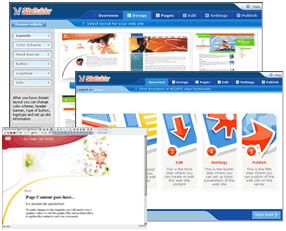
- Easy to Use Five Step Wizard - Step-by-step wizard that allows end users to create the design, structure, edit the content, define parameters and publish a website. Supported Drag and Drop.
- Intuitive WYSIWYG Editor - Allows end-users to easily edit website content without any HTML skills or knowledge.
- Hundreds of Quality Templates - SiteBuilder includes hundreds of high quality templates and tutorials on how to create and add custom templates and skins.
- Many Modules - Modules make SiteBuilder even more powerful and flexible, included are: Blog, Photogallery, Guestbook, Forum, Feeback Forms, RSS Reader, Voting, Custom Script, and a Flash intro Page.
- Site Owner Admin Panel - Enables site owners to administer several websites by providing them with capabilities to manage site statistics, create new sites, manage existing ones, configure profile, and manage e-shop orders and more.
Included Modules
- Forum - End-users can now create and manage online discussion groups. Administrators can edit name and content of posts in current sessions.
- Guestbook - Now, end-users can provide visitors to their website a sign-in form. Visitors can even leave comments for others to see on the website.
- Counter - The counter in the new version of the software allows end-users to view the number of unique visitors to their site during past 24 hour period.
- Voting - This Module provides a voting tool which allows end-users to adjust the parameters of the application and easily see the results.
- Forms Builder - In this new release, end-users can create simple forms. The information gathered from these forms will be sent to the end-users’ e-mail. End-users have the flexibility to adjust the form fields to meet their needs.
- Photo Album - This feature allows end-users to add and modify photo gallery parameters and choose templates.
- Web Content (RSS feeds) - A family of XML file formats for web syndication used by news websites and web logs.
- Flash Intro - This feature allows the end-user to use a set of templates and to customize certain parameters to create an even more exciting introduction to their site.
- SE Submission - This feature gives end-users the ability to easily submit their site into leading search engines.
